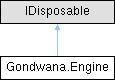
Represents the core game engine singleton responsible for managing the main update loop, input systems, rendering, timing, and subsystem coordination.
More...
|
| void | Initialize (string? configFileName=null, bool? autoSaveConfig=null, IKeyboardAdapter? keyboardAdapter=null, IMouseAdapter? mouseAdapter=null, IGamepadManager< IGamepadAdapter >? gamepadManager=null) |
| | Performs one-time or on-demand initialization of the Engine instance, loading configuration, state files, and input adapters required for execution.
|
| void | Start () |
| | Starts the Engine using the current thread's SynchronizationContext.
|
| void | Start (SynchronizationContext uiContext) |
| | Starts the Engine main loop using the provided SynchronizationContext, initializing the engine if it has not yet been started.
|
| void | Stop () |
| | Stops the Engine main loop and halts all ongoing processing.
|
| void | Dispose () |
| | Releases all resources used by the Engine and stops all subsystems.
|
Represents the core game engine singleton responsible for managing the main update loop, input systems, rendering, timing, and subsystem coordination.
The Engine class is implemented as a thread-safe singleton and provides centralized access to all major engine subsystems including input polling, scene management, rendering, and collision detection.
Typical usage involves calling Initialize to configure the engine, then Start(SynchronizationContext) to begin the main loop, and finally Stop followed by Dispose for cleanup.
| void Gondwana.Engine.Dispose |
( |
| ) |
|
Releases all resources used by the Engine and stops all subsystems.
This method performs an orderly shutdown of the engine, including:
-
Stopping the main engine loop
-
Waiting for the background thread to exit
-
Raising the Disposing event
-
Cleaning up input subsystems
-
Flushing asynchronous logs if configured
-
Clearing timers and state
-
Raising the Disposed event
After disposal, the engine instance should not be used. To restart the engine, a new application session is required.
| void Gondwana.Engine.Initialize |
( |
string? | configFileName = null, |
|
|
bool? | autoSaveConfig = null, |
|
|
IKeyboardAdapter? | keyboardAdapter = null, |
|
|
IMouseAdapter? | mouseAdapter = null, |
|
|
IGamepadManager< IGamepadAdapter >? | gamepadManager = null ) |
Performs one-time or on-demand initialization of the Engine instance, loading configuration, state files, and input adapters required for execution.
This method is responsible for preparing all core systems of the engine prior to starting the main loop. It performs the following operations in order:
-
Raises the PreInitialization event (on the UI thread if available).
-
Loads engine configuration settings from file using EngineConfigurationFile.Load.
-
Loads any EngineState files declared in configuration.
-
Initializes input subsystems for keyboard, mouse, and gamepad polling, if corresponding adapters are provided.
-
Raises PostInitialization after all internal setup is complete.
-
Marks the engine as initialized and raises InitializationComplete.
This method is automatically invoked by Start(SynchronizationContext) if the engine has not yet been initialized. It is safe to call multiple times, but subsequent calls will return immediately once initialization has been completed or is in progress.
Thread-safe guarantees:
-
Concurrent calls are prevented by internal
_isInitializing and _isInitialized flags.
-
Events that must run on the UI thread are dispatched through UiDispatcher if available.
- Parameters
-
| configFileName | Optional path to a configuration file to load. If null, the default configuration is used. |
| autoSaveConfig | Optional flag indicating whether configuration changes should be automatically saved back to disk. |
| keyboardAdapter | Optional IKeyboardAdapter instance used to initialize the keyboard input subsystem. |
| mouseAdapter | Optional IMouseAdapter instance used to initialize the mouse input subsystem. |
| gamepadManager | Optional IGamepadManager<T> instance used to initialize the gamepad subsystem. |
- See also
- Start(SynchronizationContext), Stop, EngineConfiguration, EngineState
| void Gondwana.Engine.Start |
( |
SynchronizationContext | uiContext | ) |
|
Starts the Engine main loop using the provided SynchronizationContext, initializing the engine if it has not yet been started.
This method is the entry point for runtime execution. It ensures the engine is fully initialized before beginning the continuous background processing loop. The loop runs on a separate worker thread and repeatedly invokes Cycle, yielding between iterations to allow cooperative multitasking.
The uiContext argument establishes the UiDispatcher used for posting events and callbacks to the UI thread. All UI-bound events such as PreInitialization, PostInitialization, InitializationComplete, and CPSCalculated will be marshalled through this dispatcher when available.
If the engine is already running, this method returns immediately without taking further action.
Threading behavior:
-
The engine's main loop runs on a background task, not the UI thread.
-
All rendering and timing operations are controlled through Cycle.
-
The UiDispatcher guarantees that event notifications targeting the UI are executed safely on the originating thread.
- Parameters
-
| uiContext | The SynchronizationContext that defines the UI thread context to which UI-related operations and events will be dispatched. |
- Exceptions
-
| InvalidOperationException | Thrown if uiContext is null. |
- See also
- Initialize, Stop, Cycle, UiDispatcher
| void Gondwana.Engine.Stop |
( |
| ) |
|
Stops the Engine main loop and halts all ongoing processing.
This method cleanly terminates the engine's background execution cycle started by Start(SynchronizationContext). It sets IsRunning to false, signaling the loop in Cycle to exit on the next iteration.
Stop() does not immediately dispose of resources or clear state. It simply halts ongoing updates and rendering, allowing the engine's subsystems (timers, surfaces, input pollers, etc.) to remain intact for later reuse or inspection.
To fully clean up and release all managed resources, call Dispose after stopping the engine.
This method is thread-safe and may be called from any thread.
- See also
- Start(), Cycle, Dispose(), IsRunning
Gets the current engine configuration settings.
An EngineConfiguration instance containing all engine settings.
This property provides thread-safe access to the engine's configuration, which is loaded during Initialize from a configuration file or default values.
Configuration settings control behavior such as target frame rate, logging mode, sampling intervals, and other core engine parameters.
| double Gondwana.Engine.CyclesPerSecond |
|
get |
Gets the current gross cycles per second rate.
The number of complete engine cycles executed per second, including throttled cycles.
This metric reflects all calls to Cycle, regardless of whether a foreground render was performed. It represents the engine's update frequency for background tasks such as input polling, timers, and animations.
This value is updated at the interval specified by EngineConfiguration.SamplingTimeForCPS.
| bool Gondwana.Engine.IsDisposed = false |
|
get |
Gets a value indicating whether the engine has been disposed.
true if Dispose has completed; otherwise, false.
Once this property is true, the engine instance should not be used further. All managed resources have been released and subsystems have been shut down.
| ILogger<Engine> Gondwana.Engine.Logger |
|
staticget |
Gets the logger instance used by the engine for diagnostic and informational messages.
An ILogger<TCategoryName> instance configured for the Engine type.
This logger is used internally by the engine to report initialization status, errors, warnings, and other runtime information.
Gets the engine's persistent state container for storing arbitrary key-value data.
An EngineState instance that persists across engine sessions.
The State container provides a convenient mechanism for storing game-specific configuration, player progress, or other persistent data that should survive between application runs.
State can be loaded from and saved to disk using the methods provided by the EngineState class.
| Action? Gondwana.Engine.AfterBackgroundTasksExecute |
Occurs immediately after DoBackgroundTasks(long) has completed.
Use this event to perform custom actions or monitoring after all background updates (timers, input, animations, surface refreshes, etc.) have been processed.
| Action? Gondwana.Engine.InitializationComplete |
Occurs after all initialization steps and post-initialization logic have completed.
This event is raised at the end of Initialize, every time the method is called. It signifies that the engine and its subsystems are fully active and ready for runtime operations.
If a UiDispatcher is available, this event is posted to the UI thread; otherwise, it executes on the calling thread.
| Action? Gondwana.Engine.PostInitialization |
Occurs after all internal initialization routines have completed, but before InitializationComplete is raised.
This event is raised once per engine lifetime, following successful configuration loading, state restoration, and adapter setup.
Use this event for post-initialization logic that depends on fully loaded engine settings but precedes runtime activation.
If a UiDispatcher is available, this event is posted to the UI thread; otherwise, it executes on the calling thread.
| Action? Gondwana.Engine.PreInitialization |
Occurs immediately before the engine begins its internal initialization sequence.
This event is raised once per engine lifetime, the first time Initialize is called. It provides an early hook for systems that must perform setup prior to configuration loading or input subsystem initialization.
If a UiDispatcher is available, this event is posted to the UI thread; otherwise, it executes on the calling thread.