Gondwana Game Engine
Gondwana is a cross-platform 2.5D game and rendering engine written in C#/.NET 8. It provides fine-grained control over rendering, timing, and scene composition, with built-in support for parallax, z-ordering, pixel overhang, collision detection, and particle effects. Gondwana targets desktop, mobile, and web platforms using SkiaSharp for graphics and NAudio for sound.
Loading...
Searching...
No Matches
Gondwana.Input.Mouse.IMouseAdapter Interface Reference

Defines an adapter interface for accessing mouse device state, including cursor position, button presses, scroll wheel input, and keyboard modifier states. Implementations of this interface provide abstraction over various mouse input APIs to provide unified access to mouse hardware across different platforms. More...

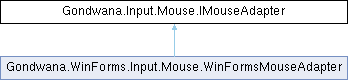
Inheritance diagram for Gondwana.Input.Mouse.IMouseAdapter:
Gondwana.WinForms.Input.Mouse.WinFormsMouseAdapter

Properties

Point CurrentPosition [get]
 Gets the current position of the mouse cursor in screen or client coordinates, depending on the implementation. This position is typically updated continuously as the user moves the mouse and represents the pixel coordinates where the cursor is currently located.
HashSet< MouseButtonPressedButtons [get]
 Gets the set of mouse buttons that are currently pressed. This collection includes identifiers for all buttons that are in the down state, such as MouseButton.Left, MouseButton.Right, MouseButton.Middle, and additional buttons if supported by the hardware. The collection is empty when no buttons are pressed.
KeyboardModifierState CurrentKeyboardModifiers [get]
 Gets the current state of keyboard modifier keys (Shift, Ctrl, Alt) at the time of mouse input. This allows mouse event handlers to respond to modified mouse actions, such as Ctrl+Click or Shift+Drag. The state can be a combination of multiple modifiers using bitwise flags.
int ScrollDelta [get]
 Gets the accumulated scroll wheel delta since the last poll, measured in implementation-defined units. Positive values indicate upward scrolling (scrolling away from the user), while negative values indicate downward scrolling (scrolling toward the user). The magnitude represents the distance or speed of the scroll. This value is typically reset or accumulated between polling intervals.

Detailed Description

Defines an adapter interface for accessing mouse device state, including cursor position, button presses, scroll wheel input, and keyboard modifier states. Implementations of this interface provide abstraction over various mouse input APIs to provide unified access to mouse hardware across different platforms.

Property Documentation

◆ CurrentKeyboardModifiers

KeyboardModifierState Gondwana.Input.Mouse.IMouseAdapter.CurrentKeyboardModifiers
get

Gets the current state of keyboard modifier keys (Shift, Ctrl, Alt) at the time of mouse input. This allows mouse event handlers to respond to modified mouse actions, such as Ctrl+Click or Shift+Drag. The state can be a combination of multiple modifiers using bitwise flags.

Implemented in Gondwana.WinForms.Input.Mouse.WinFormsMouseAdapter.

◆ CurrentPosition

Point Gondwana.Input.Mouse.IMouseAdapter.CurrentPosition
get

Gets the current position of the mouse cursor in screen or client coordinates, depending on the implementation. This position is typically updated continuously as the user moves the mouse and represents the pixel coordinates where the cursor is currently located.

Implemented in Gondwana.WinForms.Input.Mouse.WinFormsMouseAdapter.

◆ PressedButtons

HashSet<MouseButton> Gondwana.Input.Mouse.IMouseAdapter.PressedButtons
get

Gets the set of mouse buttons that are currently pressed. This collection includes identifiers for all buttons that are in the down state, such as MouseButton.Left, MouseButton.Right, MouseButton.Middle, and additional buttons if supported by the hardware. The collection is empty when no buttons are pressed.

Implemented in Gondwana.WinForms.Input.Mouse.WinFormsMouseAdapter.

◆ ScrollDelta

int Gondwana.Input.Mouse.IMouseAdapter.ScrollDelta
get

Gets the accumulated scroll wheel delta since the last poll, measured in implementation-defined units. Positive values indicate upward scrolling (scrolling away from the user), while negative values indicate downward scrolling (scrolling toward the user). The magnitude represents the distance or speed of the scroll. This value is typically reset or accumulated between polling intervals.

Implemented in Gondwana.WinForms.Input.Mouse.WinFormsMouseAdapter.