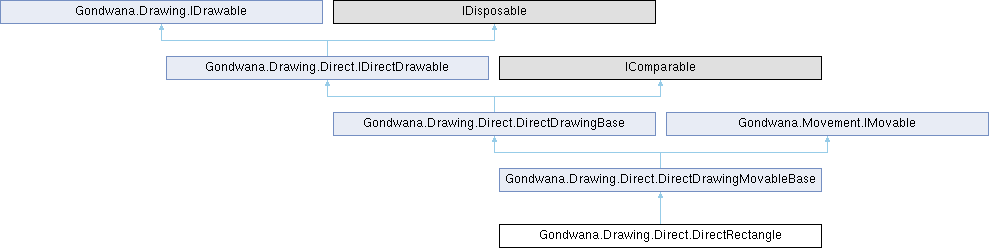
Renders a configurable rectangle with support for fill, border, rounded corners, dash patterns, color pulsing, and pattern fills.
More...
|
| | DirectRectangle (Color color, RenderSurfaceHostBase renderSurfaceHost, SceneLayer sceneLayer, Rectangle worldBounds, string? nickname=null) |
| | Initializes a new instance of the DirectRectangle class for scene-layer (world-space) rendering.
|
| | DirectRectangle (Color color, RenderSurfaceHostBase renderSurfaceHost, View view, Rectangle screenBounds, string? nickname=null) |
| | Initializes a new instance of the DirectRectangle class for view (screen-space) rendering.
|
| DirectRectangle | SetColor (Color color) |
| | Sets the base color used for both fill and stroke (unless a distinct border color is specified).
|
| DirectRectangle | SetBorderColor (Color color) |
| | Sets a distinct border (stroke) color, independent of the fill color.
|
| DirectRectangle | SetAlpha (int alpha) |
| | Sets the alpha (transparency) channel of the base color.
|
| DirectRectangle | SetFilled (bool isFilled) |
| | Sets whether the rectangle interior is filled with the base color (or pattern).
|
| DirectRectangle | SetStrokeWidth (float width) |
| | Sets the width (thickness) of the rectangle's stroke (outline) in pixels.
|
| DirectRectangle | SetCornerRadius (float radius) |
| | Sets the radius for rounded corners in pixels.
|
| DirectRectangle | SetDashPattern (float dashLength, float gapLength) |
| | Sets a simple repeating dash pattern using dash and gap lengths, in pixels.
|
| DirectRectangle | ClearDashPattern () |
| | Removes any existing dash pattern, reverting to a solid stroke.
|
| DirectRectangle | SetBlendMode (SKBlendMode mode) |
| | Sets the blend mode used when rendering this rectangle onto the canvas.
|
| DirectRectangle | SetStrokeAlign (StrokeAlign align) |
| | Sets how the rectangle's stroke is positioned relative to its bounds.
|
| DirectRectangle | PulseFill (Color from, Color to, float periodSec, bool enabled=true, bool triangle=false) |
| | Initiates an animated color transition (pulse) for the rectangle's fill between two colors.
|
| DirectRectangle | PulseBorder (Color from, Color to, float periodSec, bool enabled=true, bool triangle=false) |
| | Initiates an animated color transition (pulse) for the rectangle's border between two colors.
|
| DirectRectangle | StopPulses () |
| | Stops all active color pulsing animations (fill and border), reverting to static colors.
|
| DirectRectangle | SetFillPattern (SKBitmap bitmap, SKShaderTileMode tileX=SKShaderTileMode.Repeat, SKShaderTileMode tileY=SKShaderTileMode.Repeat, float scale=1f, SKPoint? offsetPx=null, SKFilterQuality filterQuality=SKFilterQuality.None) |
| | Sets the rectangle's fill to use a tiled bitmap pattern instead of a solid color.
|
| DirectRectangle | ClearFillPattern () |
| | Removes the current pattern fill and reverts to solid color rendering.
|
| override void | Update (long tick) |
| | Performs per-frame update logic, including pulse animation advancement and physics integration.
|
| Vector2 | GetPosition () |
| | Gets the current position of this direct drawing in pixel coordinates.
|
| void | SetPosition (Vector2 p) |
| | Sets the position of this direct drawing to the specified pixel coordinates.
|
| RectangleF | GetDrawLocationScreen (View view) |
| | Gets the screen-space drawing location for this direct drawing as seen from the specified view.
|
| void | Draw (BackbufferBase backbuffer, RectangleF destRectScreen) |
| | Renders this direct drawing to the backbuffer at the specified screen location.
|
| DirectDrawingBase | SetOpacity (float opacity) |
| | Instantly sets the opacity to the specified value without animation.
|
| DirectDrawingBase | FadeTo (float targetOpacity, float durationSec) |
| | Initiates a smooth fade transition to the specified target opacity over the given duration.
|
| DirectDrawingBase | FadeIn (float durationSec) |
| | Fades this direct drawing from its current opacity to fully opaque over the specified duration.
|
| DirectDrawingBase | FadeOut (float durationSec) |
| | Fades this direct drawing from its current opacity to fully transparent over the specified duration.
|
| DirectDrawingBase | CancelFade () |
| | Cancels any active fade transition, leaving the opacity at its current value.
|
| DirectDrawingBase | SetReveal (float t01) |
| | Instantly sets the reveal progress to the specified value without animation.
|
| DirectDrawingBase | SetRevealDirection (RevealDirection dir) |
| | Sets the direction from which the reveal animation progresses.
|
| DirectDrawingBase | RevealTo (float t01, float durationSec, Func< float, float >? easing=null) |
| | Initiates a smooth reveal animation to the specified target progress over the given duration, optionally using a custom easing function.
|
| int | CompareTo (DirectDrawingBase? other) |
| | Compares this direct drawing to another for sorting by ZOrder.
|
| void | Dispose () |
| | Releases all resources used by this DirectDrawingBase instance.
|
| override bool | Equals (object? obj) |
| | Determines whether the specified object is equal to the current direct drawing.
|
| override int | GetHashCode () |
| | Returns a hash code for this direct drawing.
|
|
| override void | OnDraw (BackbufferBase backbuffer, RectangleF destRectScreen) |
| | Renders the rectangle to the backbuffer with all configured properties and effects applied.
|
| | DirectDrawingMovableBase (RenderSurfaceHostBase renderSurfaceHost, DirectDrawingMode mode, SceneLayer? sceneLayer, View? view, Rectangle? screenBounds, Rectangle? worldBounds, string? name=null) |
| | Initializes a new instance of the DirectDrawingMovableBase class with integrated movement capabilities.
|
| void | OnDraw (BackbufferBase backbuffer, RectangleF destRectScreen) |
| | Performs the concrete drawing for this direct drawing to the backbuffer.
|
| | DirectDrawingBase (RenderSurfaceHostBase renderSurfaceHost, DirectDrawingMode mode, SceneLayer? sceneLayer, View? view, Rectangle? screenBounds, Rectangle? worldBounds, string? nickname=null) |
| | Initializes a new instance of the DirectDrawingBase class.
|
| virtual void | Dispose (bool disposing) |
| | Releases resources used by this DirectDrawingBase instance.
|
|
| static bool | operator== (DirectDrawingBase? left, DirectDrawingBase? right) |
| | Determines whether two direct drawing instances are equal using reference equality.
|
| static bool | operator!= (DirectDrawingBase? left, DirectDrawingBase? right) |
| | Determines whether two direct drawing instances are not equal using reference equality.
|
| static bool | operator< (DirectDrawingBase? left, DirectDrawingBase? right) |
| | Determines whether the Z-order of the left direct drawing is less than the right.
|
| static bool | operator<= (DirectDrawingBase? left, DirectDrawingBase? right) |
| | Determines whether the Z-order of the left direct drawing is less than or equal to the right.
|
| static bool | operator> (DirectDrawingBase? left, DirectDrawingBase? right) |
| | Determines whether the Z-order of the left direct drawing is greater than the right.
|
| static bool | operator>= (DirectDrawingBase? left, DirectDrawingBase? right) |
| | Determines whether the Z-order of the left direct drawing is greater than or equal to the right.
|
| readonly RenderSurfaceHostBase | _renderSurfaceHost |
| | The render surface host that manages this direct drawing's rendering pipeline.
|
| Rectangle | _screenBounds |
| | The current screen-space bounds for view-mode direct drawings, in pixels.
|
| Rectangle | _worldBounds |
| | The current world-space bounds for scene-layer-mode direct drawings, in pixels.
|
| int | _zOrder |
| | The Z-order used for draw sorting. Higher values draw later (on top).
|
| bool | _visible |
| | Indicates whether this direct drawing is currently visible and should be rendered.
|
| long | _lastTick = HighResTimer.GetCurrentTick() |
| | The last engine tick value used for delta-time calculations in Update.
|
| MovementController | Movement [get] |
| | Gets the movement controller that manages physics-based position, velocity, and forces for this direct drawing.
|
| MovementSpace | PositionSpace [get] |
| | Gets the coordinate space in which this movable object's position is expressed.
|
| bool | HideWhenFullyTransparent = true [get, set] |
| | Gets or sets a value indicating whether this direct drawing should be automatically hidden when its opacity reaches zero during fade transitions.
|
| RenderSurfaceHostBase | RenderSurfaceHost [get] |
| | Gets the render surface host that manages this direct drawing's rendering pipeline.
|
| DirectDrawingMode | Mode [get] |
| | Gets the drawing mode that determines how this direct drawing is positioned and transformed.
|
| SceneLayer? | SceneLayer [get] |
| | Gets the scene layer to which this direct drawing is attached, or null if the drawing is in view mode.
|
| View? | View [get] |
| | Gets the view to which this direct drawing is attached, or null if the drawing is in scene-layer mode.
|
| Rectangle | ScreenBounds [get, set] |
| | Gets or sets the screen-space bounds of this direct drawing in pixels.
|
| Rectangle | WorldBounds [get, set] |
| | Gets or sets the world-space bounds of this direct drawing in pixels.
|
| TypedValueBag | ValueBag = new() [get] |
| | Gets the extensible value bag for storing arbitrary key-value data associated with this direct drawing.
|
| Guid | Id = Guid.NewGuid() [get] |
| | Gets the unique identifier for this direct drawing.
|
| string? | Nickname [get] |
| | Gets the optional human-readable name for this direct drawing.
|
| int | ZOrder [get, set] |
| | Gets or sets the Z-order (depth) used for sorting this direct drawing relative to other drawables.
|
| bool | Visible [get, set] |
| | Gets or sets a value indicating whether this direct drawing is visible and should be rendered.
|
| float | Opacity [get, set] |
| | Gets or sets the current opacity of this direct drawing.
|
| EventHandler< IDirectDrawable >? | Disposing |
| | Occurs when this direct drawing is being disposed.
|
| EventHandler< DirectDrawingBase >? | FadeToCompleted |
| | Occurs when a fade transition initiated by FadeTo, FadeIn, or FadeOut completes.
|
| EventHandler< IDirectDrawable >? | Disposing |
| | Occurs when the object is being disposed.
|
Renders a configurable rectangle with support for fill, border, rounded corners, dash patterns, color pulsing, and pattern fills.
DirectRectangle provides a high-performance, retained-mode rectangle rendering solution with extensive customization options. It supports both world-space (scene-layer mode) and screen-space (view mode) positioning, making it suitable for both in-game UI elements and world-space markers.
Key features:
-
Configurable fill color and optional distinct border color with independent alpha channels.
-
Stroke width and alignment control (inside, outside, or centered on the rectangle boundary).
-
Rounded corners with configurable radius.
-
Dash patterns for creating dashed or dotted borders.
-
Color pulsing animations for fill and/or border (sine or triangle wave).
-
Pattern fills using tiled bitmaps with configurable tiling modes and scaling.
-
Blend mode support for advanced compositing effects (screen, multiply, additive, etc.).
-
Physics-based movement via inherited DirectDrawingMovableBase capabilities.
Performance characteristics: DirectRectangle caches SKPaint instances and rebuilds them only when properties change, minimizing GC pressure and native interop overhead. Stroke alignment and dash patterns are computed per-frame but use efficient math operations.
All setter methods return this to enable fluent-style method chaining. Each setter automatically marks the affected screen regions as dirty to trigger rerendering on the next frame.
Thread safety: This class is not thread-safe. All operations should be performed on the UI thread.
var panel = new DirectRectangle(Color.SteelBlue, renderSurfaceHost, view, screenBounds)
.SetFilled(true)
.SetBorderColor(Color.Navy)
.SetStrokeWidth(4f)
.SetCornerRadius(12f)
.SetDashPattern(8f, 4f);
var glow = new DirectRectangle(Color.FromArgb(64, 255, 200, 0), renderSurfaceHost, view, screenBounds2)
.SetFilled(true)
.SetBlendMode(SKBlendMode.Screen);
glow.PulseBorder(Color.FromArgb(255, 255, 64, 64), Color.FromArgb(80, 255, 0, 0), 1.2f);
| DirectRectangle Gondwana.Drawing.Direct.DirectRectangle.SetBorderColor |
( |
Color | color | ) |
|
Sets a distinct border (stroke) color, independent of the fill color.
- Parameters
-
| color | The border color to apply. |
- Returns
- This DirectRectangle instance for method chaining.
When a border color is set, the stroke uses this color instead of the base color set by SetColor. This allows for rectangles with different fill and outline colors, such as a white panel with a dark border.
The border color has its own alpha channel, independent of the fill's alpha. To remove the distinct border color and revert to using the base color, call SetColor again without setting a border color, or set the border color to match the base color.
The affected screen regions are automatically marked as dirty to trigger rerendering on the next frame. If border pulsing is active, calling this method will not affect the pulsing animation until StopPulses is called.
| DirectRectangle Gondwana.Drawing.Direct.DirectRectangle.SetDashPattern |
( |
float | dashLength, |
|
|
float | gapLength ) |
Sets a simple repeating dash pattern using dash and gap lengths, in pixels.
- Parameters
-
| dashLength | Length of each visible dash, in pixels. |
| gapLength | Length of the transparent gap between dashes, in pixels. |
- Returns
- This DirectRectangle instance for method chaining.
This is a shorthand for creating a repeating [dash, gap] pattern (e.g., (8, 4) for 8 px dash, 4 px gap). The pattern is applied to the stroke (outline) only and has no effect on filled rectangles without a stroke.
Dash patterns are useful for creating dashed borders, focus indicators, or selection outlines. The pattern repeats continuously around the rectangle's perimeter.
To remove the dash pattern and revert to a solid stroke, call ClearDashPattern.
No dirty-rectangle marking is performed by this method alone; the effect becomes visible on the next render pass if the rectangle is already dirty from other property changes.
| DirectRectangle Gondwana.Drawing.Direct.DirectRectangle.SetFillPattern |
( |
SKBitmap | bitmap, |
|
|
SKShaderTileMode | tileX = SKShaderTileMode::Repeat, |
|
|
SKShaderTileMode | tileY = SKShaderTileMode::Repeat, |
|
|
float | scale = 1f, |
|
|
SKPoint? | offsetPx = null, |
|
|
SKFilterQuality | filterQuality = SKFilterQuality::None ) |
Sets the rectangle's fill to use a tiled bitmap pattern instead of a solid color.
- Parameters
-
| bitmap | The source bitmap to tile across the rectangle's interior. |
| tileX | The horizontal tiling mode (Repeat, Mirror, or Clamp). Default is Repeat. |
| tileY | The vertical tiling mode (Repeat, Mirror, or Clamp). Default is Repeat. |
| scale | Optional uniform scale factor applied to the bitmap. 1.0 = native size (default). |
| offsetPx | Optional offset in pixels to shift the pattern origin. Null = no offset (default). |
| filterQuality | The filter quality to use when scaling the pattern. Default is None (nearest-neighbor). |
- Returns
- This DirectRectangle instance for method chaining.
Pattern fills replace the solid color fill with a repeating texture. The bitmap is tiled according to the specified tile modes and scaled/offset as configured. This is useful for textured panels, patterned backgrounds, or decorative UI elements.
The base color set by SetColor tints the pattern multiplicatively. Set it to white to preserve the pattern's original colors, or use another color to apply a tint.
The pattern uses the rectangle's current coordinate space (world or screen). The scale parameter affects the pattern's size, while offsetPx shifts the pattern's origin, allowing for animated or scrolling textures.
The bitmap is not owned by this DirectRectangle; the caller must manage its lifetime and ensure it remains valid while in use.
This method automatically enables filled mode (SetFilled(true)) to make the pattern visible. The affected screen regions are automatically marked as dirty to trigger rerendering on the next frame.
To remove the pattern and return to solid color fill, call ClearFillPattern.
| override void Gondwana.Drawing.Direct.DirectRectangle.Update |
( |
long | tick | ) |
|
|
virtual |
Performs per-frame update logic, including pulse animation advancement and physics integration.
- Parameters
-
| tick | The current engine tick value from HighResTimer. |
This method overrides DirectDrawingMovableBase.Update to add color pulsing animation support. It performs the following operations:
-
Calculates elapsed time since the last update using high-resolution timing.
-
Advances the pulse time accumulator for sine/triangle wave generation.
-
Updates the fill color if fill pulsing is enabled, interpolating between the pulse colors.
-
Updates the border color if border pulsing is enabled, interpolating between the pulse colors.
-
Marks affected regions as dirty if color changes occurred.
-
Calls
base.Update(tick) to perform physics integration and fade/reveal animations.
The pulse animation uses a continuous time accumulator that wraps around the specified period, ensuring smooth, consistent animation. Color interpolation is performed in RGB space with linear blending (including alpha channel).
Override this method in derived classes to add custom per-frame logic. Always call base.Update(tick) to preserve pulsing, movement, and fade/reveal functionality.
Reimplemented from Gondwana.Drawing.Direct.DirectDrawingMovableBase.