Gondwana Game Engine
Gondwana is a cross-platform 2.5D game and rendering engine written in C#/.NET 8. It provides fine-grained control over rendering, timing, and scene composition, with built-in support for parallax, z-ordering, pixel overhang, collision detection, and particle effects. Gondwana targets desktop, mobile, and web platforms using SkiaSharp for graphics and NAudio for sound.
Loading...
Searching...
No Matches
Gondwana.Drawing.Direct.DirectImage Class Referencesealed

Renders a bitmap or image to a rectangular region with support for scaling modes, source clipping, tinting, opacity, blend modes, and rotation. More...

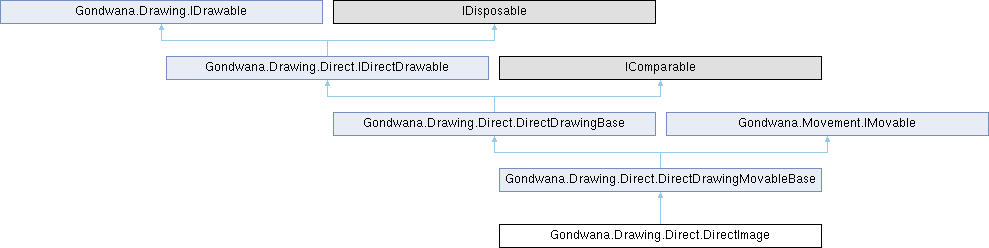
Inheritance diagram for Gondwana.Drawing.Direct.DirectImage:
Gondwana.Drawing.Direct.DirectDrawingMovableBase Gondwana.Drawing.Direct.DirectDrawingBase Gondwana.Movement.IMovable Gondwana.Drawing.Direct.IDirectDrawable Gondwana.Drawing.IDrawable

Public Types

enum  ScaleMode {
  Stretch , Fit , Fill , Center ,
  PixelPerfect
}
 Defines how an image is scaled to fit within the destination rectangle. More...
Public Types inherited from Gondwana.Drawing.Direct.DirectDrawingBase
enum  RevealDirection { LeftToRight , RightToLeft , TopToBottom , BottomToTop }
 Defines the direction from which a reveal animation progressively displays the direct drawing. More...

Public Member Functions

 DirectImage (SKBitmap bitmap, RenderSurfaceHostBase renderSurfaceHost, SceneLayer sceneLayer, Rectangle worldBounds, string? nickname=null)
 Initializes a new instance of the DirectImage class for scene-layer (world-space) rendering using a bitmap.
 DirectImage (SKBitmap bitmap, RenderSurfaceHostBase renderSurfaceHost, View view, Rectangle screenBounds, string? nickname=null)
 Initializes a new instance of the DirectImage class for view (screen-space) rendering using a bitmap.
 DirectImage (SKImage image, RenderSurfaceHostBase renderSurfaceHost, SceneLayer sceneLayer, Rectangle worldBounds, string? nickname=null)
 Initializes a new instance of the DirectImage class for scene-layer (world-space) rendering using a pre-encoded image.
 DirectImage (SKImage image, RenderSurfaceHostBase renderSurfaceHost, View view, Rectangle screenBounds, string? nickname=null)
 Initializes a new instance of the DirectImage class for view (screen-space) rendering using a pre-encoded image.
DirectImage SetBitmap (SKBitmap bitmap)
 Replaces the backing bitmap with a new one.
DirectImage SetImage (SKImage image)
 Replaces the backing image with a new one.
DirectImage SetSourceRect (SKRect? srcPixels)
 Sets the source rectangle within the image to display, enabling sprite sheet support.
DirectImage SetScaleMode (ScaleMode mode)
 Sets how the image is scaled to fit within the destination rectangle.
DirectImage SetTint (SKColor color)
 Applies a color tint (multiplicative blend) to the image.
DirectImage ClearTint ()
 Removes any color tint, restoring the image's original colors.
DirectImage SetOpacity (byte alpha)
 Sets the overall opacity (alpha transparency) of the image.
DirectImage SetBlendMode (SKBlendMode mode)
 Sets the Skia blend mode used when compositing this image onto the backbuffer.
DirectImage SetFilterQuality (SKFilterQuality q)
 Sets the filter quality used when scaling the image.
DirectImage SetRotation (float degrees)
 Sets the rotation angle in degrees around the anchor point.
DirectImage SetAnchor (float ax, float ay)
 Sets the rotation and scaling anchor point within the destination rectangle using normalized coordinates.
Public Member Functions inherited from Gondwana.Drawing.Direct.DirectDrawingMovableBase
Vector2 GetPosition ()
 Gets the current position of this direct drawing in pixel coordinates.
void SetPosition (Vector2 p)
 Sets the position of this direct drawing to the specified pixel coordinates.
override void Update (long tick)
 Performs per-frame update logic, including fixed-timestep physics integration for movement.
Public Member Functions inherited from Gondwana.Drawing.Direct.DirectDrawingBase
RectangleF GetDrawLocationScreen (View view)
 Gets the screen-space drawing location for this direct drawing as seen from the specified view.
void Draw (BackbufferBase backbuffer, RectangleF destRectScreen)
 Renders this direct drawing to the backbuffer at the specified screen location.
DirectDrawingBase SetOpacity (float opacity)
 Instantly sets the opacity to the specified value without animation.
DirectDrawingBase FadeTo (float targetOpacity, float durationSec)
 Initiates a smooth fade transition to the specified target opacity over the given duration.
DirectDrawingBase FadeIn (float durationSec)
 Fades this direct drawing from its current opacity to fully opaque over the specified duration.
DirectDrawingBase FadeOut (float durationSec)
 Fades this direct drawing from its current opacity to fully transparent over the specified duration.
DirectDrawingBase CancelFade ()
 Cancels any active fade transition, leaving the opacity at its current value.
DirectDrawingBase SetReveal (float t01)
 Instantly sets the reveal progress to the specified value without animation.
DirectDrawingBase SetRevealDirection (RevealDirection dir)
 Sets the direction from which the reveal animation progresses.
DirectDrawingBase RevealTo (float t01, float durationSec, Func< float, float >? easing=null)
 Initiates a smooth reveal animation to the specified target progress over the given duration, optionally using a custom easing function.
int CompareTo (DirectDrawingBase? other)
 Compares this direct drawing to another for sorting by ZOrder.
void Dispose ()
 Releases all resources used by this DirectDrawingBase instance.
override bool Equals (object? obj)
 Determines whether the specified object is equal to the current direct drawing.
override int GetHashCode ()
 Returns a hash code for this direct drawing.

Protected Member Functions

override void OnDraw (BackbufferBase backbuffer, RectangleF destRectScreen)
 Renders the image to the backbuffer with all configured transformations and effects applied.
Protected Member Functions inherited from Gondwana.Drawing.Direct.DirectDrawingMovableBase
 DirectDrawingMovableBase (RenderSurfaceHostBase renderSurfaceHost, DirectDrawingMode mode, SceneLayer? sceneLayer, View? view, Rectangle? screenBounds, Rectangle? worldBounds, string? name=null)
 Initializes a new instance of the DirectDrawingMovableBase class with integrated movement capabilities.
Protected Member Functions inherited from Gondwana.Drawing.Direct.DirectDrawingBase
void OnDraw (BackbufferBase backbuffer, RectangleF destRectScreen)
 Performs the concrete drawing for this direct drawing to the backbuffer.
 DirectDrawingBase (RenderSurfaceHostBase renderSurfaceHost, DirectDrawingMode mode, SceneLayer? sceneLayer, View? view, Rectangle? screenBounds, Rectangle? worldBounds, string? nickname=null)
 Initializes a new instance of the DirectDrawingBase class.
virtual void Dispose (bool disposing)
 Releases resources used by this DirectDrawingBase instance.

Additional Inherited Members

Static Public Member Functions inherited from Gondwana.Drawing.Direct.DirectDrawingBase
static bool operator== (DirectDrawingBase? left, DirectDrawingBase? right)
 Determines whether two direct drawing instances are equal using reference equality.
static bool operator!= (DirectDrawingBase? left, DirectDrawingBase? right)
 Determines whether two direct drawing instances are not equal using reference equality.
static bool operator< (DirectDrawingBase? left, DirectDrawingBase? right)
 Determines whether the Z-order of the left direct drawing is less than the right.
static bool operator<= (DirectDrawingBase? left, DirectDrawingBase? right)
 Determines whether the Z-order of the left direct drawing is less than or equal to the right.
static bool operator> (DirectDrawingBase? left, DirectDrawingBase? right)
 Determines whether the Z-order of the left direct drawing is greater than the right.
static bool operator>= (DirectDrawingBase? left, DirectDrawingBase? right)
 Determines whether the Z-order of the left direct drawing is greater than or equal to the right.
Protected Attributes inherited from Gondwana.Drawing.Direct.DirectDrawingBase
readonly RenderSurfaceHostBase _renderSurfaceHost
 The render surface host that manages this direct drawing's rendering pipeline.
Rectangle _screenBounds
 The current screen-space bounds for view-mode direct drawings, in pixels.
Rectangle _worldBounds
 The current world-space bounds for scene-layer-mode direct drawings, in pixels.
int _zOrder
 The Z-order used for draw sorting. Higher values draw later (on top).
bool _visible
 Indicates whether this direct drawing is currently visible and should be rendered.
long _lastTick = HighResTimer.GetCurrentTick()
 The last engine tick value used for delta-time calculations in Update.
Properties inherited from Gondwana.Drawing.Direct.DirectDrawingMovableBase
MovementController Movement [get]
 Gets the movement controller that manages physics-based position, velocity, and forces for this direct drawing.
MovementSpace PositionSpace [get]
 Gets the coordinate space in which this movable object's position is expressed.
Properties inherited from Gondwana.Drawing.Direct.DirectDrawingBase
bool HideWhenFullyTransparent = true [get, set]
 Gets or sets a value indicating whether this direct drawing should be automatically hidden when its opacity reaches zero during fade transitions.
RenderSurfaceHostBase RenderSurfaceHost [get]
 Gets the render surface host that manages this direct drawing's rendering pipeline.
DirectDrawingMode Mode [get]
 Gets the drawing mode that determines how this direct drawing is positioned and transformed.
SceneLayerSceneLayer [get]
 Gets the scene layer to which this direct drawing is attached, or null if the drawing is in view mode.
ViewView [get]
 Gets the view to which this direct drawing is attached, or null if the drawing is in scene-layer mode.
Rectangle ScreenBounds [get, set]
 Gets or sets the screen-space bounds of this direct drawing in pixels.
Rectangle WorldBounds [get, set]
 Gets or sets the world-space bounds of this direct drawing in pixels.
TypedValueBag ValueBag = new() [get]
 Gets the extensible value bag for storing arbitrary key-value data associated with this direct drawing.
Guid Id = Guid.NewGuid() [get]
 Gets the unique identifier for this direct drawing.
string? Nickname [get]
 Gets the optional human-readable name for this direct drawing.
int ZOrder [get, set]
 Gets or sets the Z-order (depth) used for sorting this direct drawing relative to other drawables.
bool Visible [get, set]
 Gets or sets a value indicating whether this direct drawing is visible and should be rendered.
float Opacity [get, set]
 Gets or sets the current opacity of this direct drawing.
Events inherited from Gondwana.Drawing.Direct.DirectDrawingBase
EventHandler< IDirectDrawable >? Disposing
 Occurs when this direct drawing is being disposed.
EventHandler< DirectDrawingBase >? FadeToCompleted
 Occurs when a fade transition initiated by FadeTo, FadeIn, or FadeOut completes.
Events inherited from Gondwana.Drawing.Direct.IDirectDrawable
EventHandler< IDirectDrawable >? Disposing
 Occurs when the object is being disposed.

Detailed Description

Renders a bitmap or image to a rectangular region with support for scaling modes, source clipping, tinting, opacity, blend modes, and rotation.

DirectImage provides a flexible way to display images (either SKImage or SKBitmap) with extensive control over rendering appearance. It supports both world-space (scene-layer mode) and screen-space (view mode) positioning, making it suitable for both in-game sprites and UI elements.

Key features:

  • Multiple scaling modes: stretch, fit, fill, center, and pixel-perfect.
  • Source rectangle clipping to display specific regions of an image (sprite sheets).
  • Color tinting and opacity control for visual effects.
  • Rotation around a configurable anchor point within the destination rectangle.
  • Customizable Skia blend modes and filter quality for advanced rendering.
  • Physics-based movement via inherited DirectDrawingMovableBase capabilities.

Important: DirectImage does not take ownership of the provided SKImage or SKBitmap. The caller is responsible for managing the lifetime of image resources and ensuring they remain valid while the DirectImage is in use. Dispose of image resources only after disposing the DirectImage.

All setter methods return this to enable fluent-style method chaining. Each setter automatically marks the affected screen regions as dirty to trigger rerendering on the next frame.

Thread safety: This class is not thread-safe. All operations should be performed on the UI thread.

// Create an image in world space with fit scaling and rotation
var image = new DirectImage(myBitmap, renderSurfaceHost, sceneLayer, worldBounds)
.SetScaleMode(DirectImage.ScaleMode.Fit)
.SetRotation(45f)
.SetAnchor(0.5f, 0.5f)
.SetTint(new SKColor(255, 200, 200))
.SetOpacity(200);
// Apply physics-based movement
image.Movement.ApplyImpulse(new Vector2(100, -50));

Member Enumeration Documentation

◆ ScaleMode

Defines how an image is scaled to fit within the destination rectangle.

The scale mode determines the relationship between the source image dimensions and the destination rectangle, controlling whether the image is stretched, letterboxed, cropped, or displayed at native resolution.

Enumerator
Stretch 

Stretches the image to fill the entire destination rectangle, ignoring aspect ratio. The image may appear distorted if the aspect ratios do not match.

Fit 

Scales the image to fit entirely within the destination rectangle while preserving aspect ratio. Letterboxing (empty space) may appear on the sides or top/bottom if aspect ratios differ. The image is centered within the destination rectangle.

Fill 

Scales the image to completely cover the destination rectangle while preserving aspect ratio. The image may be cropped on the sides or top/bottom if aspect ratios differ. The image is centered within the destination rectangle.

Center 

Displays the image at its native resolution without scaling, centered in the destination rectangle. If the image is larger than the destination, it will be clipped. If the image is smaller, empty space will appear around it.

PixelPerfect 

Scales the image by the largest integer factor that fits within the destination rectangle while preserving aspect ratio. Minimum scale factor is 1 (no scaling down). This mode is ideal for pixel art to avoid sub-pixel rendering artifacts.

Constructor & Destructor Documentation

◆ DirectImage() [1/4]

Gondwana.Drawing.Direct.DirectImage.DirectImage ( SKBitmap bitmap,
RenderSurfaceHostBase renderSurfaceHost,
SceneLayer sceneLayer,
Rectangle worldBounds,
string? nickname = null )

Initializes a new instance of the DirectImage class for scene-layer (world-space) rendering using a bitmap.

Parameters
bitmapThe bitmap to display. Must not be null. The caller retains ownership and must manage its lifetime.
renderSurfaceHostThe render surface host that manages rendering for this image. Must not be null.
sceneLayerThe scene layer to which this image is attached. The image will be positioned in world coordinates relative to this layer.
worldBoundsThe world-space bounds in pixels defining the image's position and size.
nicknameAn optional human-readable name for this image, useful for debugging and identification.
Exceptions
ArgumentNullExceptionThrown when bitmap or renderSurfaceHost is null.

This constructor creates an image positioned in world coordinates that moves with the camera and is affected by the scene layer's parallax factor. Use this for in-game sprites, background elements, and other world-space visuals.

The bitmap is converted to SKImage during rendering for optimal performance. The caller must ensure the bitmap remains valid for the lifetime of this DirectImage instance.

◆ DirectImage() [2/4]

Gondwana.Drawing.Direct.DirectImage.DirectImage ( SKBitmap bitmap,
RenderSurfaceHostBase renderSurfaceHost,
View view,
Rectangle screenBounds,
string? nickname = null )

Initializes a new instance of the DirectImage class for view (screen-space) rendering using a bitmap.

Parameters
bitmapThe bitmap to display. Must not be null. The caller retains ownership and must manage its lifetime.
renderSurfaceHostThe render surface host that manages rendering for this image. Must not be null.
viewThe view to which this image is attached. The image will be positioned in screen coordinates relative to this view's viewport.
screenBoundsThe screen-space bounds in pixels defining the image's position and size within the viewport.
nicknameAn optional human-readable name for this image, useful for debugging and identification.
Exceptions
ArgumentNullExceptionThrown when bitmap or renderSurfaceHost is null.

This constructor creates an image positioned in screen coordinates that remains fixed on screen regardless of camera movement. Use this for UI elements, HUD overlays, menus, and other screen-space visuals.

The bitmap is converted to SKImage during rendering for optimal performance. The caller must ensure the bitmap remains valid for the lifetime of this DirectImage instance.

◆ DirectImage() [3/4]

Gondwana.Drawing.Direct.DirectImage.DirectImage ( SKImage image,
RenderSurfaceHostBase renderSurfaceHost,
SceneLayer sceneLayer,
Rectangle worldBounds,
string? nickname = null )

Initializes a new instance of the DirectImage class for scene-layer (world-space) rendering using a pre-encoded image.

Parameters
imageThe image to display. Must not be null. The caller retains ownership and must manage its lifetime.
renderSurfaceHostThe render surface host that manages rendering for this image. Must not be null.
sceneLayerThe scene layer to which this image is attached. The image will be positioned in world coordinates relative to this layer.
worldBoundsThe world-space bounds in pixels defining the image's position and size.
nicknameAn optional human-readable name for this image, useful for debugging and identification.
Exceptions
ArgumentNullExceptionThrown when image or renderSurfaceHost is null.

This constructor creates an image positioned in world coordinates that moves with the camera and is affected by the scene layer's parallax factor. Use this for in-game sprites, background elements, and other world-space visuals.

Using SKImage directly is more efficient than SKBitmap for rendering, especially when the same image is used multiple times. The caller must ensure the image remains valid for the lifetime of this DirectImage instance.

◆ DirectImage() [4/4]

Gondwana.Drawing.Direct.DirectImage.DirectImage ( SKImage image,
RenderSurfaceHostBase renderSurfaceHost,
View view,
Rectangle screenBounds,
string? nickname = null )

Initializes a new instance of the DirectImage class for view (screen-space) rendering using a pre-encoded image.

Parameters
imageThe image to display. Must not be null. The caller retains ownership and must manage its lifetime.
renderSurfaceHostThe render surface host that manages rendering for this image. Must not be null.
viewThe view to which this image is attached. The image will be positioned in screen coordinates relative to this view's viewport.
screenBoundsThe screen-space bounds in pixels defining the image's position and size within the viewport.
nicknameAn optional human-readable name for this image, useful for debugging and identification.
Exceptions
ArgumentNullExceptionThrown when image or renderSurfaceHost is null.

This constructor creates an image positioned in screen coordinates that remains fixed on screen regardless of camera movement. Use this for UI elements, HUD overlays, menus, and other screen-space visuals.

Using SKImage directly is more efficient than SKBitmap for rendering, especially when the same image is used multiple times. The caller must ensure the image remains valid for the lifetime of this DirectImage instance.

Member Function Documentation

◆ ClearTint()

DirectImage Gondwana.Drawing.Direct.DirectImage.ClearTint ( )

Removes any color tint, restoring the image's original colors.

Returns
This DirectImage instance for method chaining.

After calling this method, the image will be rendered with its original colors (equivalent to a white tint). Opacity settings from SetOpacity remain unaffected.

The affected screen regions are automatically marked as dirty to trigger rerendering on the next frame.

◆ OnDraw()

override void Gondwana.Drawing.Direct.DirectImage.OnDraw ( BackbufferBase backbuffer,
RectangleF destRectScreen )
protected

Renders the image to the backbuffer with all configured transformations and effects applied.

Parameters
backbufferThe backbuffer providing the canvas and rendering context.
destRectScreenThe destination rectangle in screen pixel coordinates where the image should be rendered.

This method is called automatically by the rendering pipeline. It performs the following operations:

  1. Converts the source bitmap to SKImage if necessary.
  2. Determines the source rectangle (full image or specified sub-rect).
  3. Computes the destination rectangle based on the scale mode.
  4. Applies tint and opacity via color filter.
  5. Applies rotation transformation around the anchor point if rotation is non-zero.
  6. Draws the image to the canvas with all effects applied.
  7. Disposes temporary SKImage instances created from bitmaps.

Do not call this method directly from game code. To trigger a redraw, call DirectDrawingBase.ForceRefresh or modify properties that affect appearance.

◆ SetAnchor()

DirectImage Gondwana.Drawing.Direct.DirectImage.SetAnchor ( float ax,
float ay )

Sets the rotation and scaling anchor point within the destination rectangle using normalized coordinates.

Parameters
axThe horizontal anchor position from 0.0 (left edge) to 1.0 (right edge). Values are clamped to this range.
ayThe vertical anchor position from 0.0 (top edge) to 1.0 (bottom edge). Values are clamped to this range.
Returns
This DirectImage instance for method chaining.

The anchor point determines the origin for rotation transformations. It is specified in normalized coordinates relative to the destination rectangle:

  • (0.0, 0.0) - Top-left corner
  • (0.5, 0.5) - Center (default)
  • (1.0, 1.0) - Bottom-right corner

For example, setting the anchor to (1.0, 0.5) and rotating will cause the image to rotate around its right-center edge, creating a door-opening effect.

Values outside the 0..1 range are clamped. The affected screen regions are automatically marked as dirty to trigger rerendering on the next frame.

◆ SetBitmap()

DirectImage Gondwana.Drawing.Direct.DirectImage.SetBitmap ( SKBitmap bitmap)

Replaces the backing bitmap with a new one.

Parameters
bitmapThe new bitmap to display. Must not be null.
Returns
This DirectImage instance for method chaining.
Exceptions
ArgumentNullExceptionThrown when bitmap is null.

This method replaces the current image source with the specified bitmap. The bitmap is converted to SKImage during rendering for optimal performance. Any previously set SKImage is discarded (but not disposed, as ownership remains with the caller).

The affected screen regions are automatically marked as dirty to trigger rerendering on the next frame. The caller retains ownership of the bitmap and must ensure it remains valid while in use.

◆ SetBlendMode()

DirectImage Gondwana.Drawing.Direct.DirectImage.SetBlendMode ( SKBlendMode mode)

Sets the Skia blend mode used when compositing this image onto the backbuffer.

Parameters
modeThe blend mode to apply. See SKBlendMode for available options.
Returns
This DirectImage instance for method chaining.

The blend mode determines how the image's pixels are combined with the existing backbuffer contents. Common modes include:

  • SKBlendMode.SrcOver (default) - Standard alpha blending.
  • SKBlendMode.Screen - Brightening effect, useful for light effects.
  • SKBlendMode.Multiply - Darkening effect, useful for shadows.
  • SKBlendMode.Plus - Additive blending for glow effects.

The affected screen regions are automatically marked as dirty to trigger rerendering on the next frame.

◆ SetFilterQuality()

DirectImage Gondwana.Drawing.Direct.DirectImage.SetFilterQuality ( SKFilterQuality q)

Sets the filter quality used when scaling the image.

Parameters
qThe filter quality level. Higher quality produces smoother results but may be slower. See SKFilterQuality for available options.
Returns
This DirectImage instance for method chaining.

Filter quality affects how the image is sampled when scaling. Options include:

  • SKFilterQuality.None - Nearest-neighbor sampling, ideal for pixel art.
  • SKFilterQuality.Low - Bilinear filtering, faster but may appear blurry.
  • SKFilterQuality.Medium (default) - Good balance of quality and performance.
  • SKFilterQuality.High - Highest quality, slowest performance.

For pixel art games, use SKFilterQuality.None combined with ScaleMode.PixelPerfect to preserve crisp pixel boundaries.

The affected screen regions are automatically marked as dirty to trigger rerendering on the next frame.

◆ SetImage()

DirectImage Gondwana.Drawing.Direct.DirectImage.SetImage ( SKImage image)

Replaces the backing image with a new one.

Parameters
imageThe new image to display. Must not be null.
Returns
This DirectImage instance for method chaining.
Exceptions
ArgumentNullExceptionThrown when image is null.

This method replaces the current image source with the specified SKImage. Any previously set SKBitmap is discarded. Using SKImage directly is more efficient for rendering than converting from SKBitmap.

The affected screen regions are automatically marked as dirty to trigger rerendering on the next frame. The caller retains ownership of the image and must ensure it remains valid while in use.

◆ SetOpacity()

DirectImage Gondwana.Drawing.Direct.DirectImage.SetOpacity ( byte alpha)

Sets the overall opacity (alpha transparency) of the image.

Parameters
alphaThe opacity value from 0 (fully transparent) to 255 (fully opaque).
Returns
This DirectImage instance for method chaining.

The opacity is applied uniformly to the entire image after any tint has been applied. An opacity of 0 makes the image invisible, while 255 renders it at full opacity.

This opacity is independent of the DirectDrawingBase.Opacity property inherited from the base class. If both are set, their effects are combined multiplicatively during rendering.

The affected screen regions are automatically marked as dirty to trigger rerendering on the next frame.

◆ SetRotation()

DirectImage Gondwana.Drawing.Direct.DirectImage.SetRotation ( float degrees)

Sets the rotation angle in degrees around the anchor point.

Parameters
degreesThe rotation angle in degrees. Positive values rotate clockwise, negative values rotate counter-clockwise.
Returns
This DirectImage instance for method chaining.

The image is rotated around the anchor point specified by SetAnchor. By default, the anchor is at the center (0.5, 0.5), so the image rotates around its center point.

A rotation of 0 degrees means no rotation. Values are not clamped; you can specify any angle, and it will wrap around (e.g., 360 degrees is equivalent to 0 degrees).

The affected screen regions are automatically marked as dirty to trigger rerendering on the next frame.

◆ SetScaleMode()

DirectImage Gondwana.Drawing.Direct.DirectImage.SetScaleMode ( ScaleMode mode)

Sets how the image is scaled to fit within the destination rectangle.

Parameters
modeThe scaling mode to apply. See ScaleMode for available options.
Returns
This DirectImage instance for method chaining.

The scale mode determines how the source image (or source rectangle) is mapped to the destination bounds. Different modes preserve or ignore aspect ratio and handle size mismatches differently:

The affected screen regions are automatically marked as dirty to trigger rerendering on the next frame.

◆ SetSourceRect()

DirectImage Gondwana.Drawing.Direct.DirectImage.SetSourceRect ( SKRect? srcPixels)

Sets the source rectangle within the image to display, enabling sprite sheet support.

Parameters
srcPixelsThe source rectangle in image pixel coordinates, or null to display the entire image. Coordinates are relative to the top-left corner of the image.
Returns
This DirectImage instance for method chaining.

Use this method to display a specific region of a larger image, which is useful for sprite sheets, texture atlases, or animated sprites. When null, the entire image is displayed.

The source rectangle dimensions do not need to match the destination rectangle; the specified region will be scaled according to the current SetScaleMode.

The affected screen regions are automatically marked as dirty to trigger rerendering on the next frame.

◆ SetTint()

DirectImage Gondwana.Drawing.Direct.DirectImage.SetTint ( SKColor color)

Applies a color tint (multiplicative blend) to the image.

Parameters
colorThe tint color to apply. Each RGB channel is multiplied with the corresponding image pixel channel.
Returns
This DirectImage instance for method chaining.

The tint color is multiplied with each pixel of the source image using SKBlendMode.Modulate. White (SKColors.White) produces no color change, while other colors shift the image's hue. Black will result in a completely black image.

The alpha channel of the tint color is ignored; use SetOpacity to control transparency. To remove the tint and restore original colors, call ClearTint.

The affected screen regions are automatically marked as dirty to trigger rerendering on the next frame.